Chrome
Any web app, including canvas, WebGL, Flutter and shadow DOM.
attention.run automates any user interface you can see. It recognises buttons, fields and dialogs from pixels in milliseconds, with no AI model call per step, and gives the same answer every time.
Test canvas apps, automate legacy desktops over VNC, and run flows on a schedule or from a webhook, with a recording of every step.
Targets
Any web app, including canvas, WebGL, Flutter and shadow DOM.
Windows, macOS, Linux, legacy apps and kiosks.
Share a local Chrome or desktop with one ssh -R command.
Later: Android, the iOS Simulator and RDP.
The idea
Most automation isn’t looking at a new screen. It’s checking whether something it has seen before is there again: the Sign-in button, the spinner, the “Saved” toast, the error dialog. That’s recognition, not understanding.
So attention.run splits the work. You, or a vision model, name the parts of the screen once: those become a library of elements. Then a native matcher finds them in every frame, answers repeat screens from a cache keyed by their pixels, and gives the same answer every time.
Nothing needs a DOM, selectors or test IDs. If it renders pixels, it works.
Same task, two ways: click Pay, then wait for the receipt.
It can miss a toast that is on screen for 300 ms. The token counts are a design estimate, not a benchmark.
The library’s elements are recognised as the screen changes. No model call while the flow runs.
| Screenshot agent | attention.run | |
|---|---|---|
| Latency | Seconds per step | Milliseconds: 2–10 ms to check a whole screen against 50 elements, less when only part of it changes. |
| Cost | Image tokens every step. Design estimate: ~1.4–2.8k for one screenshot. | No tokens. Recognition runs on a CPU, and screens it has seen before are answered from a cache. |
| Determinism | A different answer on a different run | Same screen, same element, same answer |
| Sees short-lived UI | No. A 300 ms toast is easy to miss. | Yes. The observer follows the screen as it changes. |
| A screen nobody has seen | This is where an agent is strongest. | A flow fails with the frame and the score. An agent over MCP takes a screenshot of just the part no known element explains. |
Screenshot agent: Seconds per step
attention.run: Milliseconds: 2–10 ms to check a whole screen against 50 elements, less when only part of it changes.
Screenshot agent: Image tokens every step. Design estimate: ~1.4–2.8k for one screenshot.
attention.run: No tokens. Recognition runs on a CPU, and screens it has seen before are answered from a cache.
Screenshot agent: A different answer on a different run
attention.run: Same screen, same element, same answer
Screenshot agent: No. A 300 ms toast is easy to miss.
attention.run: Yes. The observer follows the screen as it changes.
Screenshot agent: This is where an agent is strongest.
attention.run: A flow fails with the frame and the score. An agent over MCP takes a screenshot of just the part no known element explains.
Performance
A vision model takes one to five seconds and thousands of tokens to look at one screenshot. attention.run recognises the elements it already knows on a CPU, in milliseconds, so it can afford to look at every frame, not one screenshot per step.
Every frame is accounted for. Each frame is checked, skipped because nothing changed where you’re looking, or counted as dropped. Nothing goes unseen without a record of it.
You can see the cost. Every run report shows its searches, cache hits and matcher time.
How it works
Add a target: a Chrome or a VNC desktop. Watch it and drive it live in your browser.
Every session is recorded without loss, with your clicks and keys on the same clock.
Cut elements from any frame of a recording: drag a rectangle, or let a vision model suggest them. Each one is checked to be unique on its screen. An element is a small image with a name, like login/submit.
Build a flow from those elements in the visual editor, as JSON or in TypeScript, or let attention.run draft one from a recording. Run it on demand, on a schedule or from a webhook.
One runtime
A flow is the same thing in the visual editor, in JSON and in TypeScript. An AI agent reads the same screen as a few lines of text, over MCP.
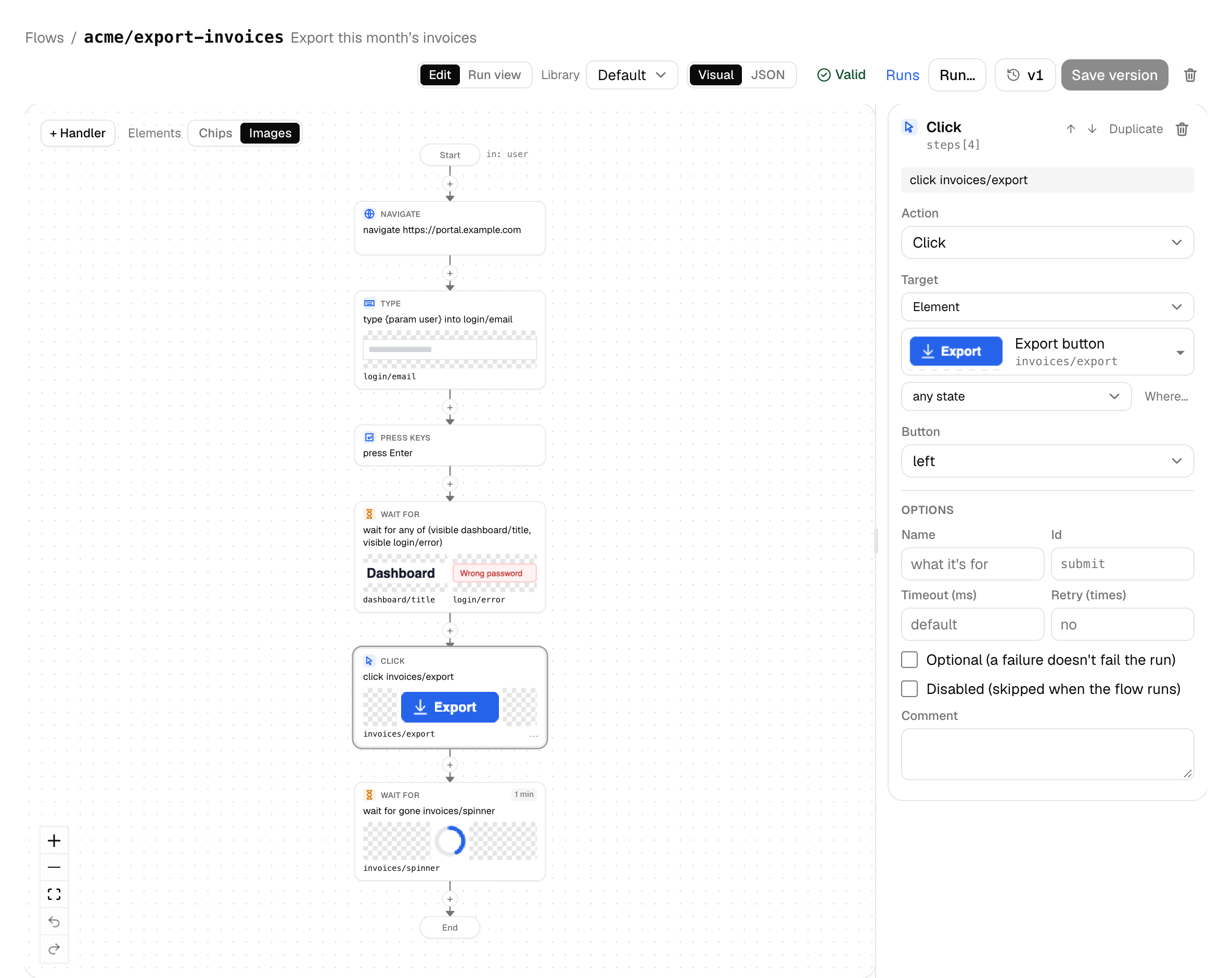
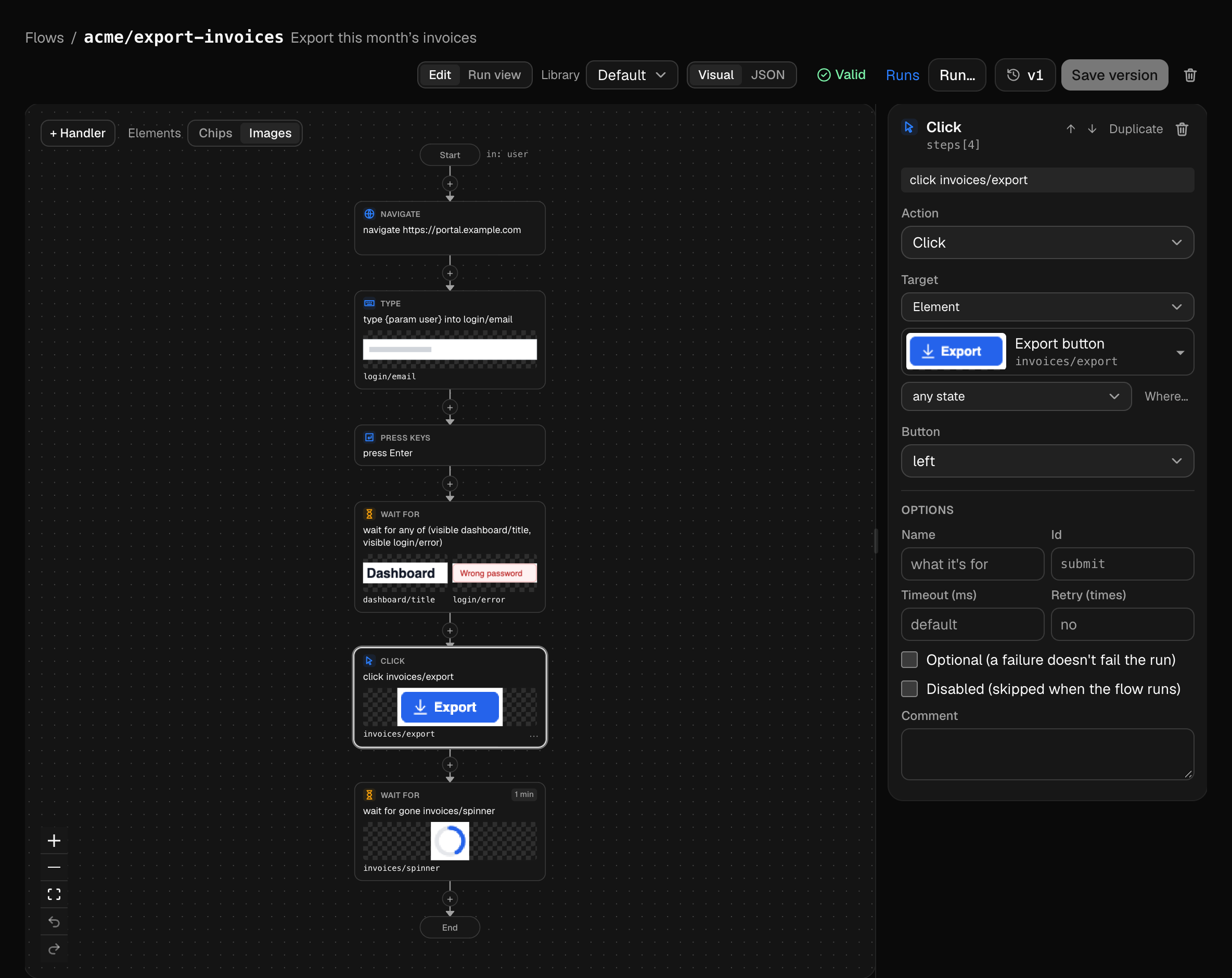
{
  "flow": "acme/export-invoices",
  "params": { "user": { "type": "string" } },
  "steps": [
    { "navigate": "https://portal.example.com" },
    { "type": { "param": "user" }, "into": "login/email" },
    { "press": "Enter" },
    { "waitFor": { "any": [{ "visible": "dashboard/title" }, { "visible": "login/error" }] } },
    { "click": "invoices/export" },
    { "waitFor": { "gone": "invoices/spinner" }, "timeout": 60000 }
  ]
}
import { any, createClient, gone, visible } from '@attn/sdk'
const attn = createClient({ url: 'https://app.attention.run', token: process.env.ATTN_TOKEN })
const s = await attn.session({ targetId: process.env.ATTN_TARGET })
await s.navigate('https://portal.example.com')
await s.type('ada@example.com', { into: 'login/email' })
await s.press('Enter')
const r = await s.waitFor(any(visible('dashboard/title'), visible('login/error')))
if (r.which === 1) throw new Error('Sign-in was rejected')
await s.click('invoices/export')
await s.waitFor(gone('invoices/spinner'), { timeout: 60_000 })session ses_… · screen checkout (2.1s) · 1366x768 · frame 57c8
visible (2):
checkout/pay-button 812,604 132x40 .98
global/help 1320,16 32x32 .99
events since last call:
14.33s appeared toast/saved 1100,40 200x30
14.74s gone toast/saved (after 0.41s)The same rules everywhere: every step waits for its element, an action is followed by a fresh frame before the next check, and an ambiguous match is an error, not a guess.
Versus visual regression
Visual regression tools diff the whole screen against a baseline. Any change fails the check: a date, an ad, a new banner. So you mask parts of the screen and approve new baselines. They also don’t drive the app, so another tool has to get it to the screen first. With attention.run, the same flow that drives the app also checks it, and it looks only at the elements you name.
click invoices/export, then waitFor toast/export-ready. The step that gets you there is the step that checks it.
A check looks for receipt/total and nothing else. The timestamp, the ad slot and the cookie banner can change without failing the run.
If part of an element changes, like a counter on a button, you mask it once in the element and every flow gets it.
The step, the frame and the score (“best 0.71, needs 0.85”), not a red diff to interpret.
Every run keeps a lossless recording, so any step’s screen can be set against the same step of an earlier run that passed. Visual comparison of those frames is coming: changes highlighted side by side, including the ones no flow checks for, like a shifted footer, without writing or maintaining a screenshot test.
Use cases
Playwright can’t see inside a canvas.
End-to-end tests for editors, maps, charts and games, where there’s no DOM to select.
No API, no selectors, an expensive RPA suite.
Apps that only give you pixels, reached over VNC, including Citrix and remote desktops.
A device screen and no test hooks.
Test the screen of a POS, kiosk or embedded HMI that runs a VNC server.
You want to know that sign-in still reaches the dashboard.
Run the flow on a schedule and see what users see, with the recording when it fails.
A report with no steps you can replay.
Every session is a replayable recording to attach to the ticket.
Screenshot loops are slow, costly, and miss flashes of UI.
Give an agent a few lines of text about the screen instead of a screenshot every step. Connect Claude, ChatGPT or Cursor over MCP.
Roadmap
Run your flows against each branch’s build and see the result as a GitHub check, with the recording when it fails.
Send a teammate or a support ticket a link to a session they can replay, frame by frame.
Put a recording’s player on your docs or a blog post, like the one at the top of this page.
Evidence
When a step fails you see the frame, where attention.run looked and how close it came: “found at 0.71, threshold 0.85”, not “element not found”. Re-cut the element from that frame and run again.
Security
Your machine connects out to share a local screen over SSH. The preview runs behind Cloudflare with no open ports.
Recognition runs on attention.run’s own matcher. Frames go to a vision model only when you ask for one: Suggest elements, or Create flow automatically.
Access is by invitation while we finish sign-in, workspaces and isolation.
Questions
Not for ordinary web apps: Playwright is excellent there. attention.run is for what Playwright can’t see, such as canvas content and desktop apps, and many teams will use both.
Checking a whole screen against 50 elements takes 2–10 ms, and a small change on screen less. There’s no model call while a flow runs, so a flow’s time goes to waiting for your app, not for a model.
No. Runs use deterministic template matching on a CPU, so a step takes milliseconds, not the seconds a model call does. A vision model helps only when you build the library or draft a flow from a recording. AI agents can drive a screen over MCP too, reading text instead of a screenshot each step.
The run fails with the frame, the expected element and the best score. Re-cut the element from that frame, or add a variant for its other looks.
A target has a fixed viewport and pixel density, and elements match at that scale. Matching across scales comes later.
In the hosted app, an invite-only preview. Share a Chrome or desktop from your own machine with one ssh -R command. A runner of your own next to your targets (attn-runner) is built; a CI recipe is planned.
No. Your recordings, libraries and flows aren’t used to train models. Frames go to a vision model on AWS Bedrock only when you ask for one: Suggest elements, or Create flow automatically.
Text the app copies to the clipboard, today. Reading text by OCR comes later.
Nothing during the invite-only preview.
Preview
Free during the invite-only preview. Tell us what you’d automate: we invite people in small batches.